 A Space for Thoughtful

Tips for Designing Math Books with InDesign: From Concept to Creation
Summarize with:
Effective InDesign books for math require a combination of good design principles, technical skills, and an understanding of the subject matter.
Designing math InDesign books for inclusivity and content accessibility requires careful consideration of the needs and preferences of diverse learners. By using clear language, visuals, alternative formats, appropriate fonts and color, cultural and linguistic sensitivity, and testing your design, you can create math books that are accessible and inclusive for all learners.
This blog will explore five top-quality interactive math tools and apps. These resources can open up a world of possibilities for learners and help teachers make math lessons more interesting and interactive.
Table of Contents:
- Seven Tips to Help You Create Compelling Math Textbooks Using InDesign
- What Math Plugins are Available for InDesign?
- Top 5 Interactive Math Tools and Apps
- Conclusion
Seven Tips to Help You Create Compelling Math Textbooks Using InDesign
- Plan Your Layout: Before you start designing your math book, consider the overall structure and layout of the book. Plan how you want the content to flow, how you will organize the chapters, and how you will present equations, examples, and exercises.
- Use a Consistent Style: To make your math book look professional and easy to read, use a consistent style throughout the book. Use the same fonts, colors, and formatting for headings, subheadings, body text, and equations.
- Use Paragraph and Character Styles: In addition to equation styles, it is also important to use paragraph and character styles to ensure consistent formatting throughout the document. Use paragraph styles to define the formatting of text blocks, and character styles to define the formatting of individual characters.
- Use Math Fonts: Math equations are an important part of math books, so it’s important to use math-specific fonts to make them clear and readable. InDesign comes with several math fonts, including MathType, so choose one that best suits your needs.
- Create Templates: To save time and maintain consistency, create templates for each section of your book. This includes the cover, table of contents, chapter headings, section headings, and equation formatting.
- Add Images and Graphics: Images and graphics can help to illustrate concepts and make the book more engaging. Use images, charts, and graphs to complement the text and help explain complex concepts.
- Pay Attention to Spacing and Alignment: Spacing and alignment are critical in math books. Make sure that equations, examples, and exercises are properly aligned and spaced, and that the overall design is visually appealing.
Mathematics is a vital tool in various fields, including science, engineering, economics, and finance. When it comes to creating documents that include mathematical equations, InDesign is a powerful tool that can help you create professional-looking publications. In this blog, we will explore InDesign Books Math Editor and how to use it to create mathematical equations.
What Math Plugins are Available for InDesign?
There are several Math plugins available for InDesign that can help you create and work with mathematical equations more efficiently. Here are a few examples:
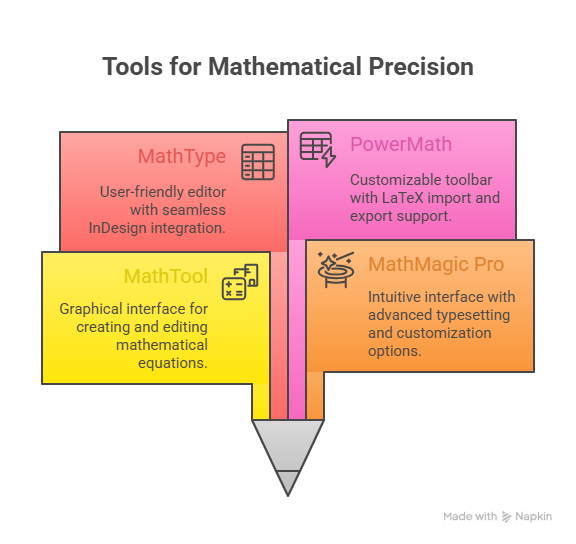
1. MathTool
- Equation Editor: MathTools provides an equation editor that allows users to create and edit mathematical equations using a graphical interface. The editor supports a wide range of mathematical symbols, functions, and operators, and allows users to format equations using various styles and options.
- Automatic Typesetting: MathTools can automatically typeset mathematical equations as users type them. The plugin recognizes the syntax of mathematical expressions and applies the appropriate formatting and spacing automatically.
- Customization Options: MathTools offers a variety of customization options that allow users to adjust the appearance of their equations to suit their needs. Users can customize the size, color, and font of equations, as well as the spacing between symbols and operators.
- Equation Libraries: MathTools includes a library of pre-built equations and expressions that users can use as templates or building blocks for their own equations. The library includes a wide range of mathematical symbols and functions, as well as templates for common mathematical structures such as fractions and matrices.
- Integration with InDesign: MathTools integrates seamlessly with Adobe InDesign, allowing users to insert mathematical equations directly into their InDesign documents. Equations can be styled and formatted like any other element in the document, and can be resized and positioned as needed.
- MathMagic Pro: MathMagic Pro is a popular plugin that allows you to create and edit mathematical equations directly within InDesign. It includes a large library of symbols and templates, as well as support for importing equations from LaTeX and MathML documents. MathMagic Pro also offers advanced formatting options, such as the ability to adjust spacing, alignment, and font size, and the option to add color and shading to equations.
2. MathMagic Editor
- Easy Equation Editing: MathMagic Pro offers an intuitive and user-friendly interface for creating and editing mathematical equations. The equation editor supports a wide range of mathematical symbols and operators, and allows users to input equations using keyboard shortcuts or graphical elements.
- Advanced Typesetting: MathMagic Pro uses advanced algorithms to typeset equations with high precision and accuracy. The software automatically adjusts the spacing and layout of equations to ensure that they are legible and aesthetically pleasing.
- Customization Options: MathMagic Pro offers a range of customization options that allow users to adjust the appearance of equations to suit their needs. Users can customize the size, color, and font of equations, as well as the spacing between symbols and operators.
- Equation Libraries: MathMagic Pro includes a library of pre-built equations and expressions that users can use as templates or building blocks for their own equations. The library includes a wide range of mathematical symbols and functions, as well as templates for common mathematical structures such as fractions and matrices.
- Integration with InDesign: MathMagic Pro integrates seamlessly with Adobe InDesign, allowing users to insert mathematical equations directly into their InDesign documents. Equations can be styled and formatted like any other element in the document, and can be resized and positioned as needed.
- Multiple Language Support: MathMagic Pro supports a wide range of languages and character sets, including Latin, Greek, Cyrillic, and Asian scripts. This makes it a versatile tool for typesetting equations in a variety of contexts.
- Math Type: MathType is a powerful equation editor that can be used as a plugin with InDesign to create and edit mathematical equations. It provides a user-friendly interface and a wide range of symbols and templates to create complex equations quickly and easily.
3. MathType Editor
- User-Friendly Interface: MathType provides a user-friendly interface that makes it easy to create and edit mathematical equations, with a wide range of symbols and templates available to use.
- Integration with InDesign: MathType integrates seamlessly with InDesign, allowing you to insert equations directly into your documents and apply formatting options such as font size, color, and alignment.
- Advanced Formatting Options: MathType provides advanced formatting options such as the ability to adjust spacing and alignment, as well as the ability to add color and shading to equations.
- Support for Importing and Exporting Equations: MathType allows you to import equations from other mathematical formats, such as LaTeX and MathML, and export your equations to a variety of formats, including PDF, HTML, and MathML.
- Customizable Keyboard Shortcuts: MathType allows you to customize keyboard shortcuts for frequently used symbols, making it easy to work quickly and efficiently.
- Compatibility with the Latest Versions of InDesign: MathType is compatible with the latest versions of InDesign, ensuring that you can work with the most up-to-date features and capabilities.
4. PowerMath
1. Support for a wide range of mathematical symbols and functions, including fractions, exponents, integrals, and more.
2. A customizable toolbar that allows you to quickly access commonly used symbols and functions.
3. Advanced formatting options, including the ability to adjust the size and position of equation elements, and the option to adjust spacing and alignment.
4. Support for importing equations from LaTeX documents.
5. The ability to export equations to a variety of formats, including MathML, LaTeX, and image formats.
6. Integration with InDesign’s Character and Paragraph styles, allowing you to quickly apply formatting to equations.
Top 5 Interactive Math Tools and Apps
Educational math apps are a great way to understand math concepts engagingly. Learners of different age groups can benefit from them.

Here are the top five interactive math tools for teachers and students:
1. GeoGebra
GeoGebra is a fast, user-friendly, and interactive math software program. The term GeoGebra is a blend of two different math topics: geometry and algebra. However, the app doesn’t confine itself to these two topics alone. Rather, this extensive app combines various topics, including geometry, statistics, algebra, and calculus, into one dynamic package.
GeoGebra is designed for learners of all stages, from primary school to university level. You can use this augmented reality app on multiple platforms, such as smartphones, tablets, laptops, and desktops.
One of the main features of the app is the interactive geometry environment. You can easily construct and edit geometric figures using this feature. The app also allows you to calculate functions of derivatives and integrals, find roots or extremum, and formulate geometric conjectures. Thanks to its unique features and smooth interface, this interactive math tool now has a huge user base.
2. Photomath
For many people around the world, the term math is synonymous with anxiety. Photomath stands to reverse this notion by helping learners overcome math anxiety and build their math skills effortlessly. The app covers a wide range of topics to facilitate math learning from second grade to senior year. It helps improve learners’ skills in various subjects, including elementary math, geometry, algebra, calculus, trigonometry, statistics, and more.
A major plus point of this app is that it offers step-by-step explanations of the problems. Due to this, learners can easily understand how a problem is solved.
An interesting feature to note is that Photomath allows you to scan any tricky problem or input it manually. This math teaching technology provides step-by-step solutions for your problems instantly. Moreover, the app uses animations to explain the steps and help you learn the concept easily.
3. Cuethink
Cuethink is an innovative and engaging math app designed for students from grades 2 to 12. This app engages students by presenting math problems as challenges. They follow a structured approach to problem-solving. They focus on breaking the problem into manageable phases so that students can grow a problem-solving mindset.
This app serves as one of the popular interactive math tools for teachers. The app enables teachers to give math tasks to the students. The tasks are assigned to each student based on their level of understanding. Students get the opportunity to work together in virtual groups and solve the sums. They learn to collaborate and learn from one another.
As far as math assessment in classrooms goes, teachers can use built-in data analysis tools to get comprehensive views of student progress. They can then assess students individually to understand their specific requirements.
4. Rocket Math
Rocket Math is a learning program that enables students to build their skills in math while having fun. The program, designed to build the foundation of math in students, uses math learning games to engage learners. It teaches students the basic building blocks on which they can conquer advanced topics in math at a later time.
The program offers access to its content and resources in two ways:
- Online Games: Game-based learning requires students to answer math questions to pass missions. The higher they rise in their missions, the tougher it gets to answer the problems. Students can get instant feedback while playing the online game.
- Worksheet Program: The worksheet program involves one-minute tests. Students need to work in pairs and use their mental abilities to solve the problems as quickly as possible.
These methods of learning and assessment help students identify knowledge gaps and engage in understanding the concepts.
5. Citizen Math
Earlier known as Mathalicious, Citizen Math follows a fresh take on teaching math to students. This learning program is meant for students in grades 6 to 12 and uses real-life examples to teach math. These examples are grounded in subjects like food, games, economics, and more.
The program offers students an engaging and immersive way of developing math skills. A big advantage of this approach is that learners get to link math to real-life objects. This makes math lessons more interesting and relevant for them.
Citizen Math also offers a host of interactive tools and support materials for teachers to engage and guide students while solving a problem. This helps drive innovation in teaching methods. Each lesson includes interactive components, such as graphs, charts, and video clips, to enhance the level of engagement and fun.
Check out this Exclusive Case Study: Hurix Digital Develops Accessible Math Videos for K-12 Students.
Conclusion
Hurix Digital has expertise in web accessibility solutions and has experience in creating digital content that meets WCAG (Web Content Accessibility Guidelines) compliance standards. We offer accessibility services such as accessibility testing, remediation, and consulting to ensure that our clients’ digital content is accessible to everyone, including people with disabilities.
Hurix Digital’s accessibility solutions focus on creating accessible eLearning courses, digital content, and mobile apps that comply with international accessibility standards. Our accessibility services include evaluating and remediating accessibility issues, creating accessible design and development, and providing accessibility training.
We also have a strong understanding of accessibility and are committed to creating accessible digital content for our clients.
To know more, contact us here.
Summarize with:

Vice President – Content Transformation at HurixDigital, based in Chennai. With nearly 20 years in digital content, he leads large-scale transformation and accessibility initiatives. A frequent presenter (e.g., London Book Fair 2025), Gokulnath drives AI-powered publishing solutions and inclusive content strategies for global clients